


How To Use A Motorcycle Helmet Communicator

Stay connected even when you’re trying to disconnect
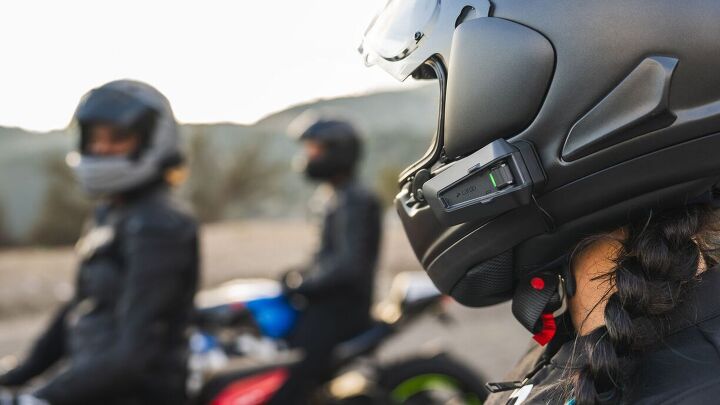
It used to be that we would hop on our motorcycles to disconnect from the world and find peace and serenity out on the open road. But now with our interconnected world, some of us have no choice but to stay tethered to the technology gods – even while riding. This isn’t necessarily a bad thing; being able to call a friend from the road, get directions piped into your ear, or listen to an actual soundtrack in addition to the one from your exhaust note all make riding more enjoyable. And if you’re riding with buddies, being able to talk to each other along the way can be invaluable.
If you’re new to all of this technology, you might be wondering: How do you use a helmet communicator, anyway? We’ve all got to start somewhere, so let us show you the way.
Pick A System

There are a few companies out there making helmet communicators, all of which have their own features and benefits. That said, Cardo and Sena are the major players in the game. This guide isn’t about taking sides, but what we can tell you is that all of them are leaps and bounds better than the communicators from decades ago that not only felt like bricks attached to the side of your helmet, and had the sound quality of a fast food joint drive-through speaker.
Today’s helmet communicators have come a long way since then and offer a variety of features – even the ones at the lowest price points. Not to mention their form and shape have been streamlined to add minimal weight to your helmet. At a minimum, a communicator needs to be able to communicate with other riders in your group also wearing a comm. More advanced units have wind-reducing technology for clearer phone calls, the ability to sync with GPS units via Bluetooth, or even the ability to detect crashes and alert first responders. Ultimately, choose the comm with the features you want and a price point that fits your budget.

One final note: this guide will primarily be referring to wireless comm units. These are small external pieces consisting of a headset, speakers, and an integrated microphone that are designed to be neatly added to your helmet. Some helmets have the headset and speakers integrated into the design of the helmet. There will be a lot of relevant information between wireless and integrated units within. Lastly, there are wired units wherein each individual piece is independent, meaning the headset is much bigger (think walkie talkie) and hides either in your riding gear or in the motorcycle. The speakers and microphone are also independent, and physical cable connections are needed between everything.
Installation
If you have an integrated comm in your helmet already, you’re done! The helmet manufacturer did all the work for you. Except for one little thing – you'll still have to buy the unit, at least in the case of helmets like the Shoei SRL. For everyone else with a wireless comm, the process is still fairly simple. Most comm units come with either a clip to slip between the cheekpad and shell of your helmet, or in the event your cheekpads are not removable, there’s an adhesive you stick to the left side of the helmet instead. Either one acts as the housing for your comm’s headset.

The speakers have different length cords, with the short side denoting the left speaker. Some helmets have a dedicated pocket for earpieces and you can simply slide them in. If your helmet doesn’t have a dedicated pocket, slip the speaker either on top or behind the liner – whichever gives you the most comfort while still being able to hear the comm clearly.
Depending on your helmet, microphone setups will be slightly different. For full-face helmets there’s usually a small wired mic. With these, you peel the adhesive backing from the mic and stick it on the underside of the chin bar, where your mouth is. Then carefully run the wire beneath or behind the padding of the helmet. Sometimes small objects like a popsicle stick can be useful for tucking the wires away. If you don’t have a full-face helmet, you’d opt for the boom mic. Here, a self-supporting, flexible arm reaches to the microphone at the end. You plug the mic to the headset, run the boom behind or below the cheekpads, and position the mic in front of your mouth.

How To Use It
Now the part you came here for. First thing’s first – you need to pair the headset with your phone and/or other units. Cardo and Sena are similar in how this is done, but not exactly the same. Depending on the model you have, you’ll need to use an app or a series of button presses on the unit itself. Check the owner’s manual for directions for your specific model. Pairing with your phone via Bluetooth will allow you to make/receive calls, listen to music on your phone, and receive navigation. You can also control the headset or your phone with voice commands, too. Pairing with others lets you all talk to each other during your ride, assuming you’re within range of each other. Some systems feature a mesh connection while others don’t, which makes the process of pairing slightly different. Again, this guide isn’t about the tech, and more about how to use the comm. So, once more, it’s important to refer to the owner’s manual for specific instructions.
Once you’re paired the hard part is over! Go ride! Depending on the model you have, you can make or receive calls with a voice command, and the same is true if you want to end the call. Conversely, buttons on the headset will answer or end a call, too. If everyone in your group is paired together, speaking to them is a simple matter of talking – that’s all you have to do. If someone gets separated from the group and is then dropped, most systems are able to reconnect once that person (or people) is back within range. When you come to a stopping point or are done riding for the day, simply turn the unit off. Most units are able to pair again once they’re all turned back on.

Enjoy The Ride
Helmet communicators are a great tool to use, whether you’re riding alone or in a group. For solo trips, you can still choose when you want to have silence or when you want some noise. When riding in groups, being able to talk to your friends not only adds to the memories, but could also be critical for warning others of road conditions ahead. Then again, if you truly do prefer the silence, you can still just turn it off. Have a helmet communicator story to share? Tell us in the comments.
We are committed to finding, researching, and recommending the best products. We earn commissions from purchases you make using the retail links in our product reviews. Learn more about how this works.
Become a Motorcycle.com insider. Get the latest motorcycle news first by subscribing to our newsletter here.
Troy's been riding motorcycles and writing about them since 2006, getting his start at Rider Magazine. From there, he moved to Sport Rider Magazine before finally landing at Motorcycle.com in 2011. A lifelong gearhead who didn't fully immerse himself in motorcycles until his teenage years, Troy's interests have always been in technology, performance, and going fast. Naturally, racing was the perfect avenue to combine all three. Troy has been racing nearly as long as he's been riding and has competed at the AMA national level. He's also won multiple club races throughout the country, culminating in a Utah Sport Bike Association championship in 2011. He has been invited as a guest instructor for the Yamaha Champions Riding School, and when he's not out riding, he's either wrenching on bikes or watching MotoGP.
More by Troy Siahaan










Comments
Join the conversation
I currently use the $50 XGP from Amazon and a $300 Cardo on separate helmets. The Cardo sounds good, and also allows music with person to person chat. The problem we've had is that the person to person chat cuts out ALL THE TIME. Literally on a 4 hour ride there are 8-10 points where there's just no connection to chat while the music continues. This is while in line of sight, so the connection has no reason to drop.
The XGP is good for music OR chat, but can't really do both. Price point is fantastic though! When chatting, we've never had it cut out, which is a major advantage over the Cardo.
Both are plenty loud to use with good earplugs, and both connect to my phone easily. Both are a tiny bit of pain to connect to other riders for chat.
So XGP--just do it. You won't regret it. Cardo, if you have the $$ and strongly want the music + chat then it's the way to go. I wish they didn't cut out constantly though.
That is exactly why I bought a communicator, to pair it with my BMW's Navigator V to hear turn-by-turn directions. It is not paired with my mobile phone as the last thing I want to hear is someone yapping be it on the phone or a passenger.
But all that would be great if I can hear the damn thing over 75 kph. It is a Sena designed for my helmet so extra mods are not necessary for it to work.
Anyway, that $339 would have been spent better on gas.